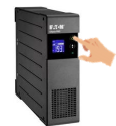
My Fruit software is installed on an industrial computer (IPC) in the control cabinet. To handle short term power outages and properly shut down the IPC during prolonged power problems, a UPS backup battery is installed. The UPS powers only the IPC and display for a limited time while a UPS alarm is generated. During momentary power outages, the system will continue as normal.
If the UPS battery runs down during a longer power outage, it will send a signal to the IPC, which will automatically shut down.
Once power is restored, the UPS battery will automatically recharge. In this case, the UPS must be manually restarted by pressing and holding the power button for 2 seconds. The IPC will then restart automatically along with the My Fruit software.
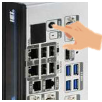
If the IPC does not start up automatically after restoring power, it can be turned on manually by pressing and holding the power button for 2 seconds. The My Fruit program can also be started manually by double clicking the My Fruit icon on the Windows screen.
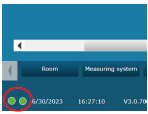
After restarting the program, it may take a while for communication in My Fruit to start. This is represented by two virtual LEDs. Both LEDs must light up green before logging into the program. This process may take several minutes. The program will then re measure the cells and take action based on the products and parameters set. During the power outage, all historical data will be retained.